Exporting Windows Live Mail to Outlook 2010
Convert EML to PST



Exporting Windows Live Mail to Outlook 2010
A Wonderful Utility to Import Emails EML to Outlook!
Windows Live Mail is an email client saved their emails in .EML file extension or Outlook contain PST format. Therefore when you need to explore your emails from Windows Live Mail to MS Outlook format it seems a bothersome situation to import your emails Windows Live Mail to Outlook format. In such cases our Exporting Windows Live Mail to Outlook 2010 very useful to those entire users who want to switch their emails from Windows Live Mail to MS Outlook PST format. It will allow you to export your entire emails EML to Outlook PST with all email attachments such as To, Bcc, Cc, attachments, sent or received items etc.
Our professional developers prepared an awesome solution to resolve the queries of users that how to import emails from Windows Live Mail to MS Outlook of how to migrate Windows Mail in PST format? You can get the opportunity to import your emails with ultra violet tool named Exporting Windows Live Mail to Outlook 2010 converter. By using this tool you will be able to import your e-mail attachments, header, properties, folder or on-disk folder of EML files into Outlook PST format.
 Download Now v6.2
  Order Full Version at $29
Export Windows Live Mail to Outlook 2007 Productively!
Do you think to export your email messages from Windows Live Mail to Outlook PST format?
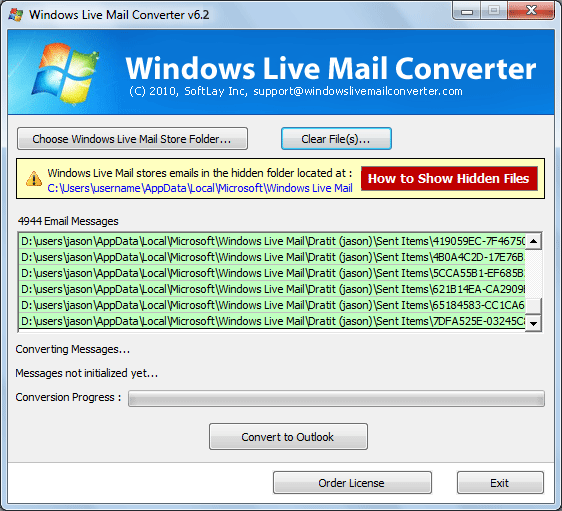
If your answer yes, than go ahead with Exporting Windows Live Mail to Outlook 2010 Converter - A well know utility to import emails with all email attributes of Windows Live Mail to Outlook PST format. This tool is become useful for all who want to export emails EML to Outlook PST. It has the utility to import emails with an efficient manner. To import emails Windows Live Mail to Outlook PST format you have to follow few steps as mentioned below:
1. Download or Install Windows Live Mail to Outlook Converter
2. Select all EML files or Folder having emails.
3. Now click on converted button to start the conversion process.
4. After that, select the desired folders or location to save the converted emails.
Download the trial mode of Upgrade from Windows Live Mail Now!
Now, you can take trial mode of our Windows Live Mail to Outlook 2010 Converter tool, while it will provide you to a facility to see the working ability or accessibility of software. By using demo version you can import your 20 mails Windows Live Mail to Outlook PST without paying any cost.
Order to purchase the licensed version
After clarifying the software's capacity or ability you can purchase the licensed version of the tool from our website. It will allow you to convert thousands of emails Windows Live Mail or Windows Mail to Outlook format.
Therefore, it's being proved that our Exporting Windows Live Mail to Outlook 2010 program can effectively or quickly performs the Windows live mail to Outlook 2010 in entire way.